
5:记录一次autodl的codex配置
记录一次配置
首先安装node.js
1 | apt update |
验证是否安装成功
1 | node -v |
安装codex
1 | npm i -g @openai/codex --registry=https://registry.npmmirror.com |
创建配置
1 | mkdir -p ~/.codex |
写以下的配置文件
1 | model_provider = "OpenAI" |
创建api的key文件nano ~/.codex/auth.json
1 | { |
codex chat验证是否成功
本博客所有文章除特别声明外,均采用 CC BY-NC-SA 4.0 许可协议。转载请注明来源 plusone's blog!
相关推荐
2026-05-05
6:论文笔记 Equalization Loss v2 A New Gradient Balance Approach for Long-tailed Object Detection
这是一个 EQLv2 (Equalization Loss v2) 目标检测项目,基于MMDetection v2框架开发并进行了深度定制。该项目主要解决长尾分布(long-tail distribution)下的目标检测问题——即数据集中大量类别具有极少的样本,导致模型在这些稀有类别上的表现极差。考虑到ddl马上到来,我们对于代码进行先行的处理。https://github.com/tztztztztz/eqlv2。 这个项目代码目前支持COCO、LVIS、OpenImages等多个长尾分布的主流的数据集。 首先我们对于项目的结构进行分析如下: 123456789101112131415161718192021222324252627mmdetection-eql/├── configs/ # 配置文件目录(37,200+ tokens,核心)│ ├── end2end/ # EQL/EQLv2 核心配置文件│ │ ├── eqlv2_r50_8x2_1x.py # EQLv2配置│ │ ├── eql_...
2026-02-28
1:bilibili下载器
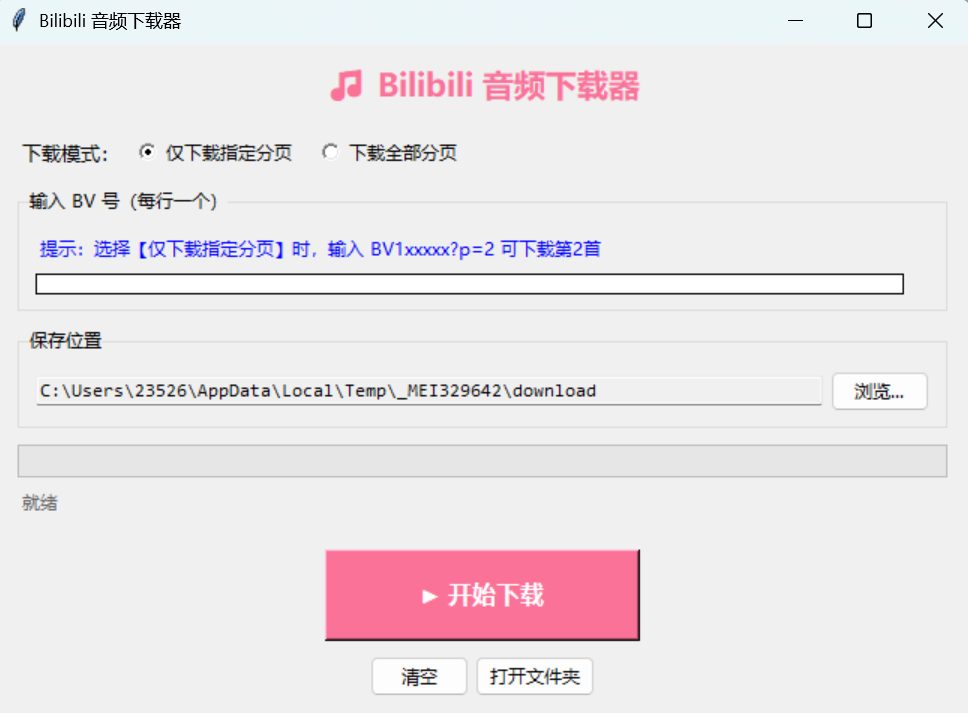
最近喜欢听钢琴曲,但很多曲子在音乐上都没有,而且很多音乐的曲子在音乐平台上都是没有的,又或者有些是UP主的天赋,很想下下来,放在耳机里循环欣赏,于是有了这个想法 参考 pangguy/bilibiliAudioDownloader-1: 输入视频BV号列表,批量下载B站视频中的音频到本地。 https://github.com/Henryhaohao/Bilibili_video_download https://github.com/SocialSisterYi/bilibili-API-collect 改进原有的代码在2021年最后一次进行更新,我们在现在进行复现,并且随着哔哩哔哩的反爬技术进一步的更新,我们需要进行一些改进,最后在原有的代码基础上,我们将其封装成为exe文件,供没有python环境的音乐爱好者们可以一起欣赏 主要功能输入视频BV号,下载B站视频中的音频到本地。 使用方法在哔站上复制BV号,然后按需要点击下载即可 获取https://github.com/lijiayi-plus/bilibili-audio-downloader-v2
2026-09-17
26:挑战杯初赛资料&思路
挑战杯初赛打榜还不错,全国第七,现把一些小的思路给同步一下 对于一个目标检测的算法,以及一个刷分且有答辩的竞赛。我们的思路实际上非常简单,一方面去各种堆叠各种创新,达到每个类别的sota,另一方面是要有理有据的创新,有着比较强的理论性,从而能在最终的答辩中比较出彩。(18 封私信 / 80 条消息) DOTAv2遥感图像旋转目标检测竞赛经验分享(Swin Transformer + Anchor free/based方案) - 知乎这一篇知乎,大佬很好地阐述了我们该如何打遥感类目标识别的竞赛,如何用细节去加点。 一、竞赛规则1.1评价指标赛方要求的评价指标是,召回率(recall,后续用R值表示)以及虚警率,1-虚警率即为准确率(precision,后续用P值表示)。 在一般的比赛中,评估用指标主要是mAP,用来衡量一个模型的整体的能力,而P值和R值,则是在IOU(计算重合程度)和conf(置信度)两个超参确定的情况下,计算出来的结果。一般而言,IOU的要求是0.5,conf可以自己调节。但是为了我们在训练阶段可以看出每个网络的强弱,我们用IOU=...
2026-06-28
20:六月总结
时间过得真快,真的在一转眼间,时间又滚过了一个月。我庆幸这个月的时间里,我过得非常的充实,获得了一些成绩,但同时,前路依旧艰险。 相比于上个月,这个月的忙碌就多了一丝从容,从看书开始,到看报,看播客。我感觉找到了我心的位置。不再是四处的奔波了。 很开心的是,现在确实在认真的看书,最让我喜欢的,是《狂喜之后》。这一本书,也许是我在所谓“心灵成长”这个课题上,指引我很久的方向。有很多时候,人类欺骗自己的能力简直和挖掘自身潜力的能力一样强,人类太善于欺骗人类自己了。如果你想要反驳,那么我想给你看看“图灵测试”。如果真的回到那个场景,你会发现里面最大的假设既然是你能不能够欺骗其它的人,非常惊讶的一个fact。 还看了毕英杰的播客,确实是精品,里面关于尼采的解读,很大程度上也是在为我现在的生活“解毒”,里面有太多的误解,在当下。 很喜欢一首歌,哔哩哔哩上面李朕老师的《诀别书》,李朕老师的频道里面很多曲子都很好听,我最喜欢的还是《诀别书》。里面在纯音乐的基础上,改编加上了卓文君的《诀别书》,融于曲子里面,而为这首曲子铺陈了起转。这首曲子,和这个词,成功洗脑了我三天时间: 春华竞芳,五色凌素...
2026-05-30
19:五月总结
一些散乱的,但属于我的思考关于工具与语言这是我的第一份不是用手敲的博客,而是用语音输入的。我用的不是 Typeless,而是 Open Typeless。这个软件没有那么强的能力,但恰恰能锻炼我的语言能力。 我忽然觉得有一点悲哀:如果你有一个非常好用的工具,它反而不会在事实上潜移默化地提升你的语言能力。工具大多数时候是好用的,关键还是看你怎么用、你自己菜不菜。一个人越是让 AI 的结构覆盖自己的完整认知,就越是一种悲哀。 我希望最后是轻盈的。我们的未来应该走向独属于自己的旅程——想来去也是轻盈的。你不可能抱着一个电脑随时问 AI 各种问题。比如遇到一道英语题,你让它翻译,我觉得这不合适。所以,还是把知识装进脑海里吧。 不要把使用 AI 当作所谓提升自己能力的另一种信息假象。 感谢自己:这周更踏实了有啥说啥,首先要感谢自己——你比上个星期更加踏实了。 30 分钟,你了解了整个 Harness,了解了 MCP、ent,还有很多像 Workflow 这样的概念。你真正开始意识到,AI 可能会对人产生颠覆性的影响——它真的有可能取代你。或许,当今世界正经历着百年未有之大变局,而 AI,是...
2026-05-22
15:大唐杯省一
大唐杯省一,进入国赛了,超开心于是水一条blog